Seedream 5.0 ProProfessional information design, multilingual text, and precise reference editing

Prefer a value-focused model for cinematic lighting and character consistency? Try Seedream 4.5

Model
Reference images (optional)(0/10)

Drop images here or choose files

JPEG, PNG, WebP · Maximum 10MB each · Up to 10 images

The first reference image is free. Each additional reference image adds 1 credit.

0/5000
Aspect ratio
Resolution
Privacy Mode
Output credits10
Reference image credits0
Total10
Credits required: 10
Demo

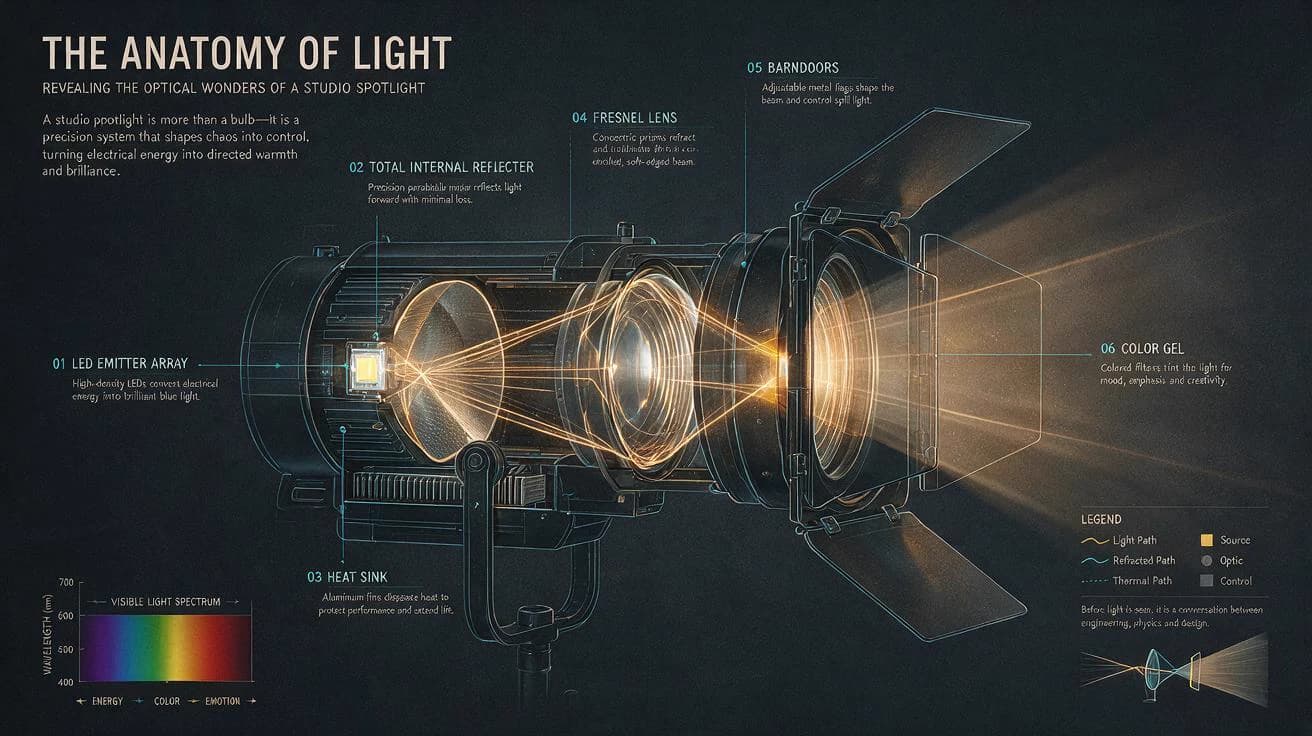
The Anatomy of Light editorial infographic, studio spotlight cutaway, numbered optical callouts, cyan technical lines, warm amber rays, Swiss grid, deep graphite background.

Information design1K or 2K preset
Seedream5.0 Pro

No history yet

Seedream 5.0 Pro AI Image Generator

Build professional information graphics, multilingual campaigns, realistic product visuals, portraits, and precise reference-guided edits.

Build images that communicate, not just decorate. The Seedream 5.0 Pro AI Image Generator turns detailed briefs into information graphics, multilingual campaigns, realistic product visuals, portraits, and reference-guided edits with professional output controls.

Designed for complex visual communication where layout, text, relationships, and material detail must work together. Use simple presets for speed or open advanced controls for exact custom dimensions.

1K, 2K, and custom sizingUp to 10 reference imagesJPEG and PNG outputDynamic credit preview

Capability matrix

How the Seedream 5.0 Pro AI Image Generator handles complex briefs

ByteDance positions Seedream 5.0 Pro beyond basic generation: it is built to understand design intent, manage complex visual information, and make targeted revisions while preserving the logic of the image.

The strongest prompts read like creative direction: define the communication goal, then specify content, hierarchy, visual language, constraints, and the details that must remain unchanged.

01

Information-rich graphics with a readable hierarchy

Turn a detailed brief into a composed visual rather than a decorative backdrop. Seedream 5.0 Pro is designed to organize titles, labels, diagrams, data blocks, and supporting imagery into a more deliberate information system.

Useful for explainers, reports, learning materials, process diagrams, campaign boards, and editorial graphics where structure matters as much as style.

02

Reference-guided editing and multi-image synthesis

Upload one image to establish a subject or combine several references for identity, palette, material, composition, and atmosphere. Describe what should change and what should remain stable in plain language.

The current generator accepts up to ten reference images and returns one flattened image. Point selection, lasso masks, and separate layer exports are not exposed in this workflow.

03

Realistic materials, light, and portrait detail

Build images around surface behavior: soft skin, woven cloth, brushed metal, glass, ceramics, printed paper, and controlled reflections. The result can feel art-directed without losing the small cues that make materials believable.

Use concrete lighting language, lens intent, material adjectives, and environmental context to give the model a practical photography brief.

04

Multilingual text as part of the composition

Create posters, signs, covers, menus, packaging concepts, and information cards that place written language inside the design. Native multilingual generation supports globally oriented creative work.

For important copy, provide the exact text, language, placement, hierarchy, and style. Always proofread generated text before publishing or sending artwork to production.

Generated studies

Professional visual languages from the Seedream 5.0 Pro AI Image Generator

These examples show how the Seedream 5.0 Pro AI Image Generator communicates information, sets multilingual type, renders nuanced materials, shapes product campaigns, and transforms references.

Seedream 5.0 Pro information graphic with a structured grid, labeled data, and clear hierarchy
01Information design

A studio spotlight cutaway organized as a legible technical system with numbered callouts, a spectrum chart, and an optical legend.

View prompt direction

The Anatomy of Light editorial infographic, studio spotlight cutaway, numbered optical callouts, cyan technical lines, warm amber rays, Swiss grid, deep graphite background.

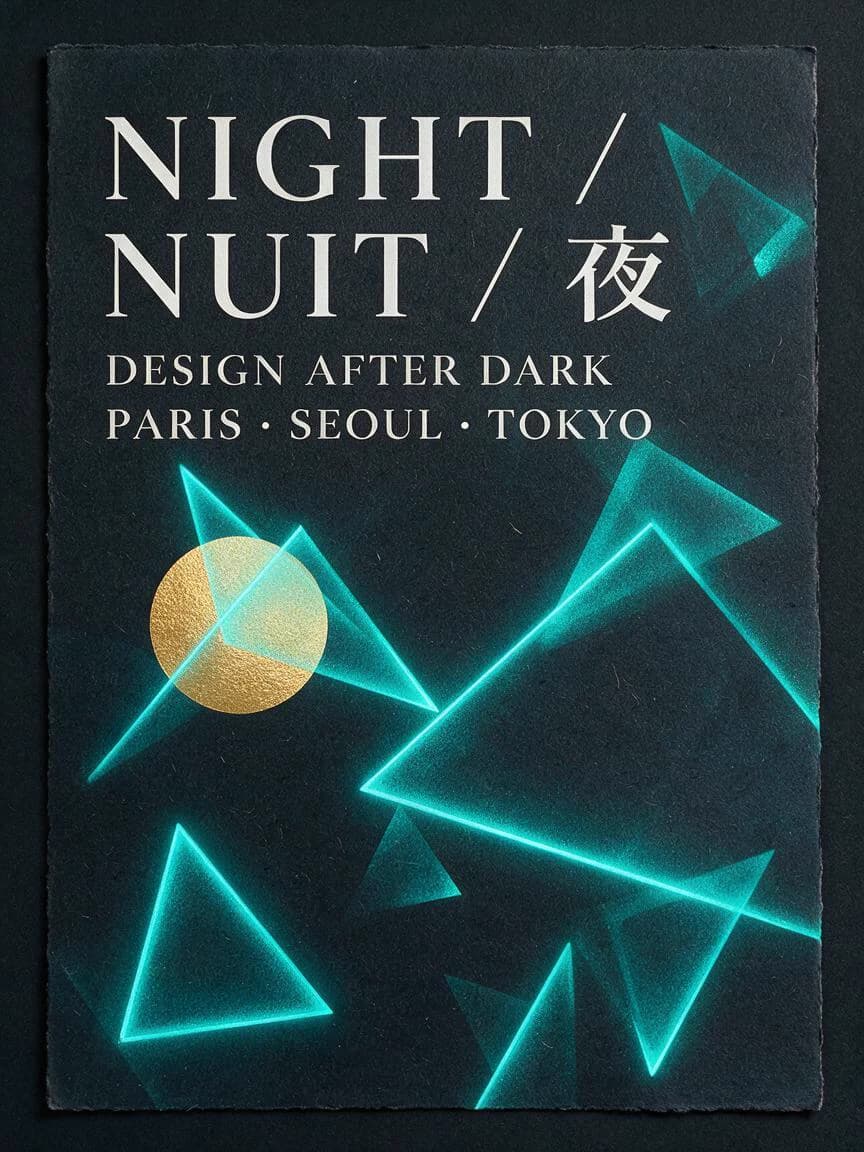
Multilingual cultural event poster created with Seedream 5.0 Pro
02Multilingual typography

A night festival poster combining English, French, and Chinese type with a coherent geometric rhythm.

View prompt direction

Night design festival poster with NIGHT, NUIT, and 夜, Paris, Seoul, and Tokyo details, luminous cyan geometry, one warm gold circle, charcoal screen-printed paper.

Editorial portrait of a ceramic artist showing realistic skin, linen, clay, and natural workshop light
03Material realism

An editorial portrait balancing believable skin, linen, raw clay, ceramic surfaces, and mixed window and practical light.

View prompt direction

East Asian ceramic artist in a quiet workshop, natural skin texture and freckles, charcoal linen apron, porcelain dust, north-window light, warm practical lamp, shelves of clay vessels.

Premium portable speaker campaign with realistic machined metal, woven mesh, limestone, and studio light
04Product campaign

A launch visual where layout, surfaces, shadows, and brand-safe negative space work together.

View prompt direction

Conceptual portable speaker campaign, machined graphite aluminum, woven acoustic mesh, warm limestone plinth, cyan rim light, amber key light, realistic micro-scratches, dark studio.

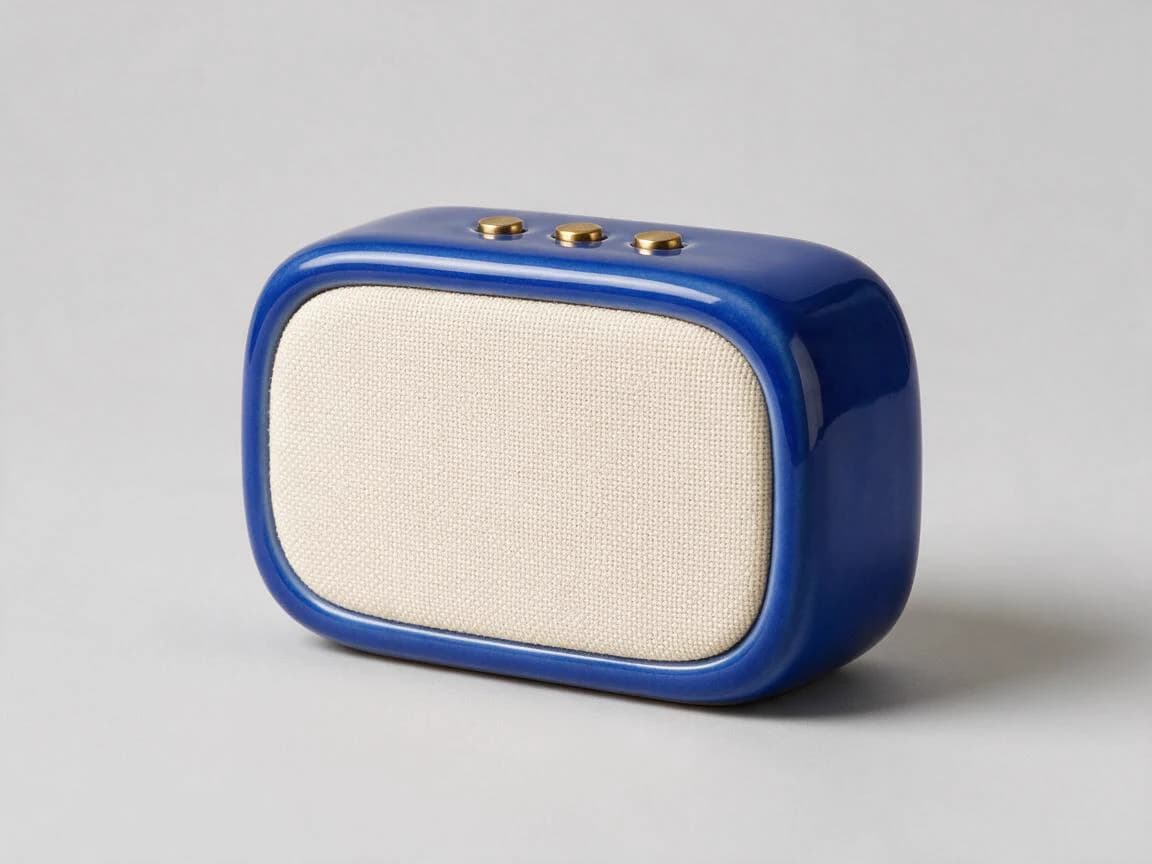
Original product reference image before a Seedream 5.0 Pro edit
05Reference input

The clean source image establishes the cobalt ceramic body, cream grille, three brass controls, shape, and camera angle to preserve.

View prompt direction

Clean studio reference of a cobalt blue ceramic portable speaker, cream woven grille, three brass buttons, neutral gray seamless background, soft daylight, front three-quarter view.

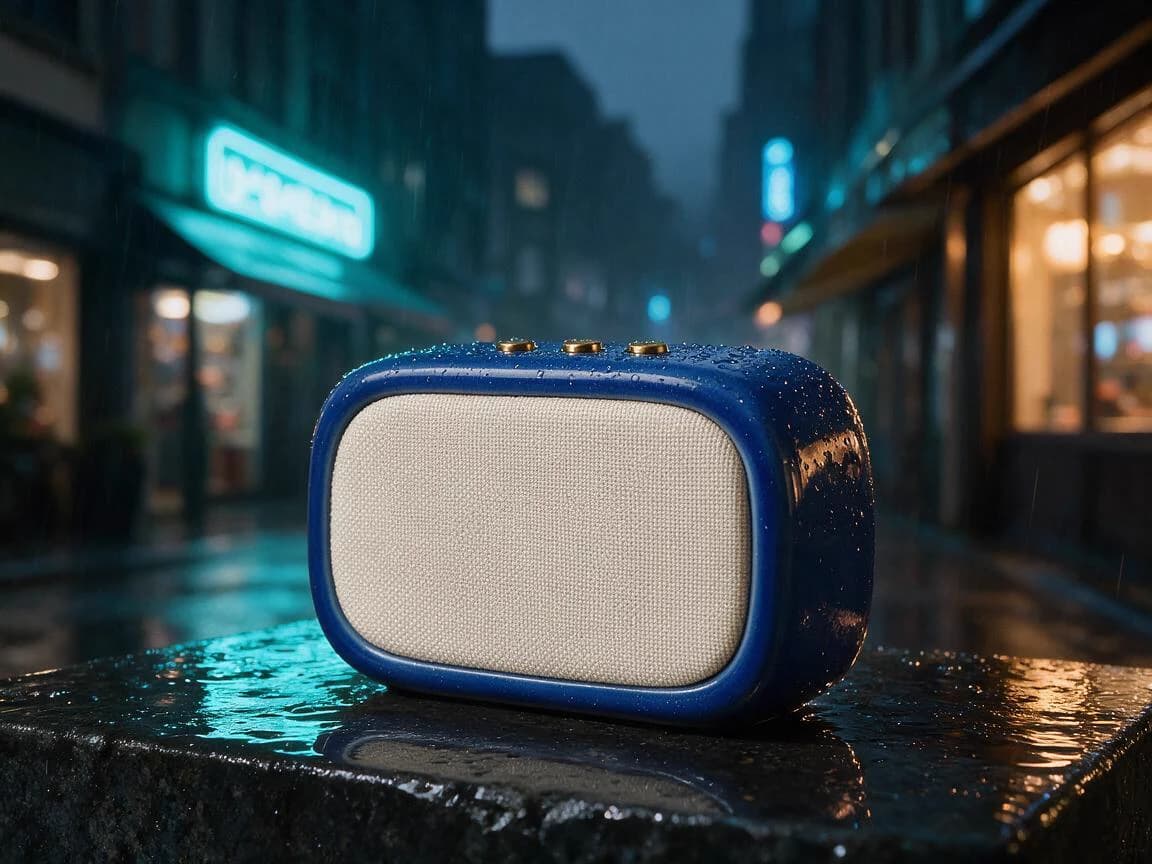
Edited product campaign image after reference-guided generation with Seedream 5.0 Pro
06Reference-guided result

The product remains recognizable while the clean studio is transformed into a rain-soaked cyan and amber city campaign.

View prompt direction

Keep the exact cobalt ceramic speaker, cream woven grille, three brass buttons, proportions, and camera angle. Move it onto wet stone in a rainy city night with cyan neon, warm shop light, and realistic droplets.

Transparent credit model

Seedream 5.0 Pro AI Image Generator pricing by pixels and references

You see the full total before submission. Output pricing changes at 2.36 million pixels, while reference pricing only begins with the second image. This keeps a single-reference editing workflow at the base output price.

At or below 2.36 MP

10

credits

Above 2.36 MP

20

credits

First reference image is free

Text-to-image and one-reference edits use the same output price. Each reference image from the second through the tenth adds one credit.

Custom size clarity

Enter width and height in Advanced settings. Invalid dimensions are flagged before generation, and the price preview changes with the final pixel count.

One result per task

Each Seedream 5.0 Pro task produces one output image. The result retains the full returned image list for reliable task handling.

Ten-reference ceiling

Combine up to ten references. Use only the images that carry a clear role to avoid conflicting identity, style, and composition signals.

Four-step workflow

How to use the Seedream 5.0 Pro AI Image Generator

Treat generation as a compact design process. Start with intent, add only useful references, choose the output geometry, then review the result with the same care you would apply to a human-made draft.

  1. 01

    Write a production brief

    Describe the subject, purpose, audience, composition, materials, lighting, typography, and exact text. A structured brief gives Seedream 5.0 Pro a clearer design problem to solve.

  2. 02

    Add references when they improve control

    Use reference images for products, people, palettes, visual languages, or layouts. The first reference is included; each reference from the second through the tenth adds one credit.

  3. 03

    Choose preset or custom dimensions

    Select a 1K or 2K preset for speed, or open Advanced settings to enter dimensions in 16-pixel increments. The generator shows pixel count and pricing before submission.

  4. 04

    Review, refine, and export

    Check visual hierarchy, factual labels, spelling, identity, and material details. Download the result or run a focused revision with a shorter list of explicit changes.

Model selection

Where the Seedream 5.0 Pro AI Image Generator fits against Lite and 4.5

Choose Pro when the image must function as a designed communication artifact. Lite remains an efficient option for web-informed and general-purpose work, while Seedream 4.5 is a value-oriented choice for cinematic imagery and consistent characters.

Current

Seedream 5.0 Pro

Professional design, information graphics, multilingual layouts, and precision-oriented reference editing

Input
Text or up to 10 reference images
Output
1K, 2K, or validated custom dimensions
Pricing
10 or 20 credits, plus additional references
Start creating

Seedream 5.0 Lite

Efficient knowledge-aware generation, web-informed creation, and everyday controllable editing

Input
Text and reference-image workflows
Output
2K or 3K output
Pricing
7 credits per output
Explore this model

Seedream 4.5

Cinematic scenes, portraits, character consistency, and value-focused image generation

Input
Text and multi-reference workflows
Output
Preset image sizes
Pricing
8 credits per output
Explore this model

Research notes

Seedream 5.0 Pro AI Image Generator: current workflow notes

The official release frames Seedream 5.0 Pro around understanding design, complex information, precise editing, and realistic visual quality. Recent workflow demonstrations also emphasize giving the model an art-directed brief instead of relying on a short style prompt.

Seedream 5.0 Pro AI Image Generator FAQ

What is the Seedream 5.0 Pro AI Image Generator?

Seedream 5.0 Pro is ByteDance's professional AI image generation model for visually complex work. It focuses on information-rich composition, precise instruction following, reference-guided editing, realistic materials and portraits, and multilingual text generation.

How many credits does Seedream 5.0 Pro use?

An output up to and including 2.36 megapixels costs 10 credits. An output above 2.36 megapixels costs 20 credits. The first reference image is free, and each additional reference image from the second through the tenth adds one credit. Your total is shown before you generate.

Which Seedream 5.0 Pro sizes are supported?

The simple controls offer 1K and 2K resolution presets with eight aspect ratios. Advanced settings support custom width and height in 16-pixel increments, subject to the generator's pixel-count and aspect-ratio limits. Seedream 5.0 Pro does not offer a 4K preset here.

Can I edit an existing image with Seedream 5.0 Pro?

Yes. Add up to ten public reference images, then describe what should change and what should remain consistent. This workflow returns a single flattened output image; point selection, lasso masking, and independent layer export are not currently available in the generator.

Does Seedream 5.0 Pro support multilingual text?

Yes. The model is designed for native multilingual image generation, making it useful for posters, covers, signs, and editorial layouts. Generated text should still be reviewed carefully for spelling, facts, and brand compliance before publication.

Does Seedream 5.0 Pro search the web?

No web-search control is exposed for Seedream 5.0 Pro in this generator. If your brief depends on current facts, provide verified information directly in the prompt and proofread the result. Seedream 5.0 Lite is the Seedream option for web-informed workflows.

How long does a Seedream 5.0 Pro generation take?

Generation commonly takes tens of seconds, and complex or high-pixel requests can take longer. You can leave the page after submission; the task continues processing and can be checked again through My Creations.

Create with the Seedream 5.0 Pro AI Image Generator

Use the Seedream 5.0 Pro AI Image Generator for information graphics, multilingual campaigns, realistic product visuals, portraits, and controlled reference-image transformations. Your task keeps processing even if you leave the page.